
How do I request a quote for PBIS Rewards ID Cards or Lanyards?
If you would like to request a quote for ID Cards or Lanyards from PBIS Rewards, you can reach out to your Account Executive directly or email [email protected] for more information.
How do I place my ID Card order within PBIS Rewards?
Orders for ID Cards can be placed directly within PBIS Rewards using the ID Card Wizard. Follow the instructions below to place an order for ID Cards:
- Login to PBIS Rewards at https://app.pbisrewards.com/login.php
- Navigate to “Settings” in your left-side menu. If you do not have a “Settings” tab, you will need to reach out to a PBIS Rewards Admin at your school to complete these steps.
- Select “ID Card Settings” from the new menu that appears.
- Click “Begin/Continue Order” to enter the ID Card Wizard and complete your order.
- Once your order is submitted through the ID Card Wizard, it will be delivered to you within 10-14 business days.
Please note: At this time, we can only provide and ship ID Cards in the United States. A minimum $15 shipping fee will apply to each order placed through the ID Card Wizard.
Why am I being asked if I would like to be billed later?
Are you seeing the message below?
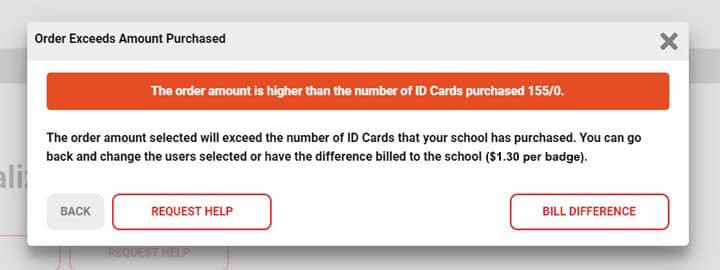
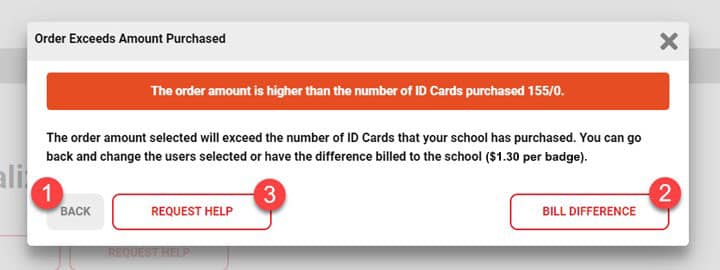
The warning message above is to let you know that the number of users selected for printing exceeds the number of ID Cards that have been purchased for your school. In order to continue you can:
- Change the user selection on the previous step (i.e. if you chose All Students And Staff you could switch to Students Only) in order to have the order number equal to or less than the number if ID Cards purchased.
- Select the “Bill Later” button and PBIS Rewards will invoice your school the difference at $1.30 per ID Card.
- Use the “Request Help” button to get in touch with one of our ID Card Techs to assist you. An ID Card Tech will reach back out within 1 business day.
Visit Our Support Site for more information on the ID Card Wizard
Our support site article contains a helpful video, along with guidance and screenshots for each step that needs to be completed within the ID Card Wizard. You can find that article here:
support.pbisrewards.com/article/id-cards/
Do you have questions about our ID Cards?
Visit our ID Card FAQ to learn more.