
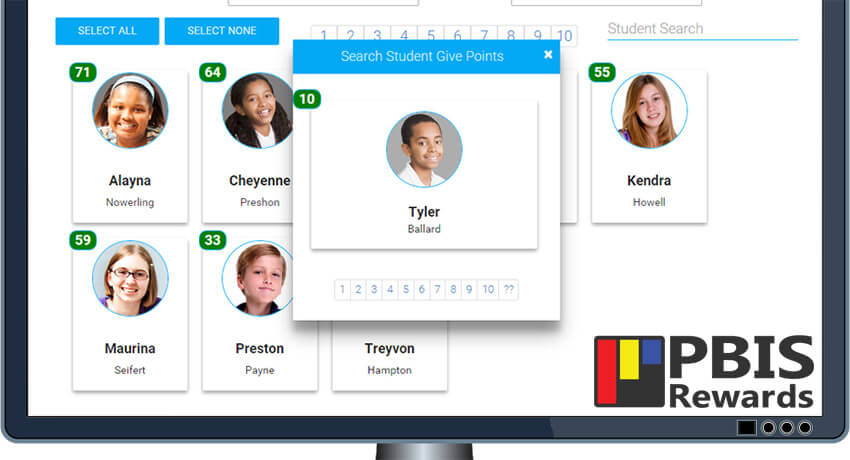
We are often asked if PBIS Rewards works with a standard computer and the answer is absolutely YES!
PBIS Rewards has a Desktop Portal and one of the really useful features is the My Groups page. A group can be any group of students… a class (e.g., 3rd Period ELA/Ms. Jones); a club (e.g., Glee Club); a sports team… any grouping that makes sense within the school. The My Groups page makes it easy for a teacher to award points to students from her desktop computer or any portable device such as a tablet computer (like an iPad).

Any staff person/teacher can create a group with minimal steps and it is easy to update the members of the group as students come and go. The teacher can award points to the entire class with a couple of clicks and can also award points to individual students from the My Groups page.
Want to give points to a student who isn’t in a group? The teacher doesn’t have to leave the My Groups page to award points to students outside of the group. The Student Search box makes it easy to find any student in the school so that the teacher can give a reward right from the desktop. Just type in the first three letters of a student’s name and the powerful search utility immediately finds matching students so that the teacher can give points as easily as possible.

The Desktop Portal can be a nearly full replacement option for schools that are 1:1 academic institutions. Staff with iPads or similar tablet devices can use the same portal to:
- Award points to any student;
- Run the store or events;
- Mark referrals.
Users with administrative privileges can do even more.
We are big fans of using the smartphone app to facilitate giving points to students for doing the right thing because…
- It is a one-to-one interaction between the staff and student where the staff can verbally recognize the student and affirm the action/behavior;
- It doesn’t require the staff person to know the student’s name in advance to facilitate an interaction with the student since the staff person will simply scan the student’s ID card; and
- It allows every staff person to be involved in recognizing students – teachers, administrative staff, custodians, cafeteria workers… they just need a smartphone in their pocket and they’ve become part of your PBIS team… truly schoolwide PBIS.
We recognize, however, that not all school staffers own a smartphone and PBIS Rewards is still a great system if you need to rely on computers for tracking your students’ successes.